It is no secret that F&B and retail sectors require special working hours and a roster of full-time and part-time shift workers in order to provide uninterrupted service to customers. Figuring out the roster, enforcing schedules, tracking time and attendance and running payroll can be quite the nightmare!
Not to mention, at the end of each month, the payroll components of each of these shift work employees must somehow be carefully recorded to match the salary metrics agreed in their employment contract and what each staff actually did. This process is complicated and time-consuming if done manually using pen & paper or excel sheets. But with payroll software in place, the hassle of running payroll for shift workers can be greatly reduced.
Let’s walk through how to handle payroll for shift workers, with a look at how software makes each step easier from clock-in to pay-check issuance.
How to Handle Payroll for Shift Workers
1. Schedule
Right at the start, managers coordinate when employees will work, making sure there are enough staff for each shift and that everyone’s hours fit the needs of the business and regulatory requirements. This involves considering factors like employee availability, skill levels, and any specific requests or preferences. If managers use the roster software to plan when employees will work, then the software will create a schedule based on things like who’s available, their skills, and any special requests.
Managers can use scheduling tools to organise shifts, review availability and communicate changes. Keeping these records together supports workforce management, while managers remain responsible for checking staffing needs and approving the schedule.
2. Timesheet
Employees record their work hours on a sheet, noting when they start and finish each shift. This ensures that they get paid the right amount for the time they put in. With software, employees can easily input their hours, and the system calculates their total work time, including any overtime or breaks. Managers can also review and approve timesheets digitally, streamlining the process and improving efficiency.
3. Consolidate and Tabulate Timesheet Data
Payroll software steps in here, HR uses the payroll software to gather and organize all the timesheet information. They then use this data to calculate how much employees should be paid, factoring in things like hours worked, overtime, and any other adjustments.
4. Record to payroll
This stage involves inputting all necessary information such as hours worked, overtime, deductions, and taxes if applicable into the payroll software and processing it to generate accurate payroll payments for employees.
5. Add custom pay items if needed
In some cases, there may be special payments or allowances that need to be included in the payroll calculations, such as bonuses for exceptional performance or shift differentials for working during unsociable hours. These custom pay items are added to the payroll system to ensure that employees are compensated fairly and in accordance with company policies.
6. Review and finalise payroll
Review attendance exceptions, pay items and payroll totals before finalising the payrun. Resolve discrepancies with the relevant manager or employee rather than assuming automated calculations need no checking.
7. Prepare payslips and payment files
After finalising payroll, prepare payslips and any supported bank payment files. Check the bank details and payment totals, then complete payment authorisation through your bank. Generating a file does not itself transfer wages.
8. Check Malaysian statutory contributions and tax
Review the EPF, SOCSO, EIS and PCB amounts that apply to each employee, together with any applicable employer levy. Keep employer liabilities separate from employee deductions, and check eligibility and wage treatment against current Malaysian guidance.
9. Complete statutory submissions and payments
Prepare the applicable Malaysian statutory submission files and check their totals against payroll. Complete submissions and payments through the relevant authority channels, and retain the acknowledgements. File generation alone does not confirm submission or payment.
Tips in Mapping Out the Suitable Payroll Software for Shift Worker
In addition to understanding each stage of the payroll process for shift workers, here are four tips in mapping out a payroll software that suits your business.
- Know your headcount.
Payroll software generally charges based on the number of workers in a payroll cycle. Hence, it is important to know how many workers will be registered for the payroll software.
- Pick payroll software with a shift schedule and timesheet features.
Employee scheduling is crucial for managers and HR teams in businesses, especially those with a shift system. Good scheduling with an accurate timesheet will make the workflow neatly controlled and easy to track for payroll purposes.
- Look for payroll integration.
By having payroll integration as a service, companies can eliminate the need for manual data entry and streamline payroll processing, significantly reducing associated administrative tasks such as checking on attendance and leave data, timesheet calculation, and compensation and funds.
- Provide a custom pay item feature.
Custom pay items are important for shift workers because they allow for tailored compensation structures that accurately reflect the unique nature of their work schedules. For example, in the food and beverage industry, a custom pay item for shift workers could be “night shift differential,” which provides additional compensation for employees working during late hours to account for the inconvenience and potential impact on personal schedules.
Why PayrollAny is Perfectly Fit for Shift Work Payroll
PayrollAny is built on an advanced scheduling and attendance system, specifically a shift work management model. Designed to meet the needs of frontliners in the F&B, Retail, and Healthcare industries, this integrated system simplifies the payroll process, eliminating the need to manually shuffle and consolidate data.
With PayrollAny, it’s time to ditch the spreadsheets because it has feature that automatically consolidate timesheets from all your shift workers, feeding into powerful formulas that automatically churn out accurate payroll.
In the PayrollAny system, different businesses will also find custom pay items that are specifically designed to meet the needs of the pay components in diverse business environments. PayrollAny’s customized formulas handle your unique pay structures with ease, whether it be overtime multipliers, attendance bonuses, meal allowances or other custom pay items.
With PayrollAny, users will also get a number of other StaffAny features for F&B operational optimization, such as scheduling, CICO, and smart timesheet.
With the scheduling tool, you can plan schedules more efficiently, helping control costs better and faster.
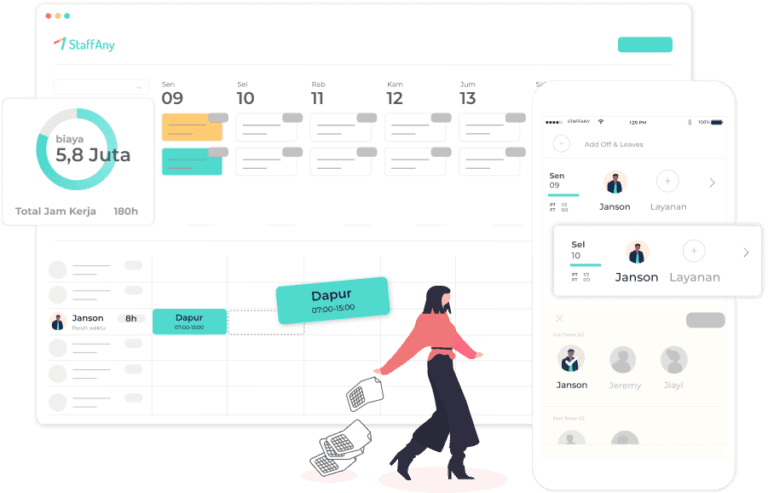
Our attendance system does more than just give information; it provides accurate attendance details to HR instantly, solving issues caused by poor communication.

Also, smart timesheets help speed up tracking time and managing attendance records.
Conclusion
In conclusion, the presence of PayrollAny makes seamless integration between scheduling, timekeeping, and payroll calculation, so that managers can ensure accurate and timely compensation for their employees. And eventually they can focus more on providing the best service to customers.
Do you find payroll for shift workers complicated to do? Schedule a demo with us and we will help you find a solution that best suits your needs.